 Afterhue
Sunset color palette hex codes
A sunset palette usually needs five or six colors: a deep blue or violet for the top of the sky, rose and coral in the middle, amber and pale gold at the horizon. This page gives three ready-made sets with hex codes, then shows how to extract real colors from your own photo.
Coming soon to iPhone
What is a good sunset color palette?
A convincing palette follows the order of the sky, which we describe in sunset colors in order. Take a dark cool color for the top, one or two mid colors in the pink to coral range, and a warm light for the horizon. Aim for five or six values. Fewer feels flat, and more makes it hard to use.
The hex codes below are example values chosen to match the usual stack, not measurements of a particular evening. Use them as a starting point and adjust by eye.
Palette 1: a classic clear sunset
This is the textbook set, from the blue overhead to the pale gold at the horizon.
| Name | Hex | Where it sits in the sky |
|---|---|---|
| Deep blue | #1B2A49 | Top of the sky |
| Dusk violet | #5B4B8A | Upper middle |
| Rose | #D9658B | Middle |
| Coral | #F4845F | Lower middle |
| Amber | #F9B44C | Near the horizon |
| Pale gold | #FDE2A3 | At the horizon line |
Palette 2: afterglow after the sun is gone
The sky after sunset is cooler and softer. Purples and roses dominate, and the warmth shrinks to a thin band.
| Name | Hex | Where it sits in the sky |
|---|---|---|
| Night plum | #2E1F47 | Top of the sky |
| Twilight purple | #7A3E7E | Upper middle |
| Rose dusk | #C85A7C | Middle |
| Salmon | #F28C6B | Low |
| Peach glow | #FFC27A | Thin band at the horizon |
Palette 3: a smoky, red evening
When particles in the air deepen the red, the palette moves toward brick and ember.
| Name | Hex | Where it sits in the sky |
|---|---|---|
| Burnt umber | #3B2A2A | Top, dark and heavy |
| Brick | #8C2F1F | Upper middle |
| Ember | #D4501E | Middle |
| Marigold | #F39C3A | Low |
| Sand | #E8C07D | Horizon |
How do I use a palette in design?
Use three colors as the main fills and two as accents. A dark color works well as a background for text, and a warm light color works for highlights. Check contrast before putting text on any of them, since mid-tone pinks and corals are hard to read against each other. If you build a gradient, keep the order from the sky: dark at the top, warm at the bottom.
How do I get exact colors from my own sunset photo?
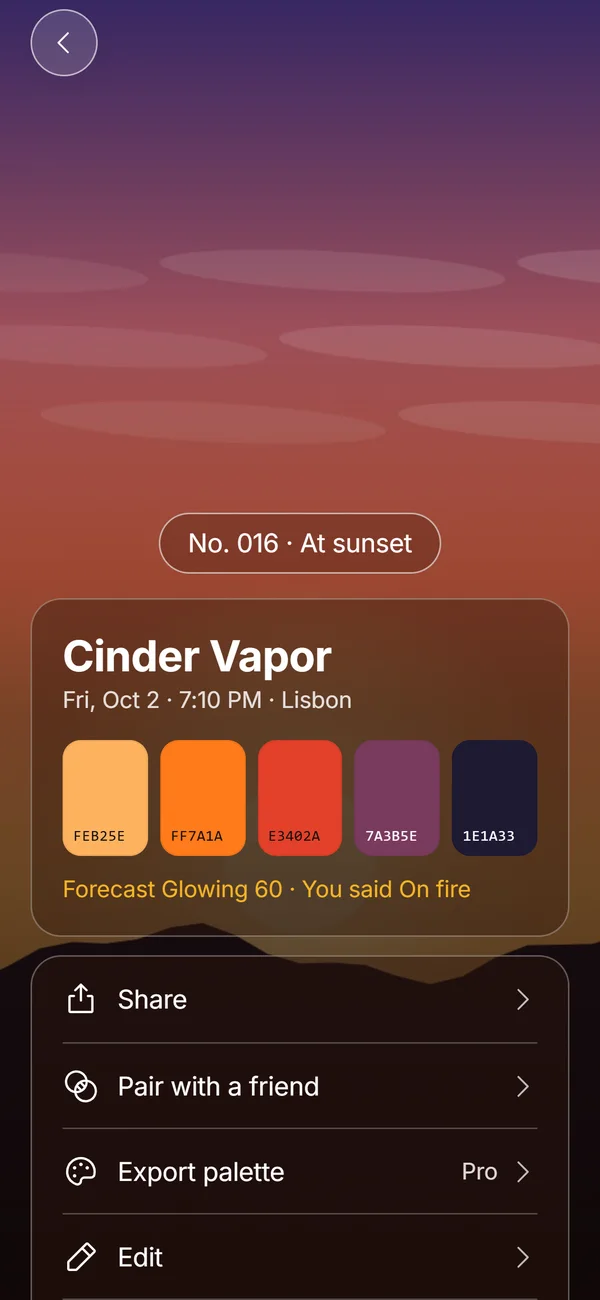
You can sample colors from any photo with a color picker, but a sunset has thousands of pixels in each band. A tool that groups similar pixels picks better representatives. Afterhue does this on the phone when you make a Hue Chip: it shrinks the photo, groups pixels into clusters, drops tiny ones, merges near-identical ones and picks five that favor large and vivid areas.
- Tap Catch it on the Tonight screen or the plus in Collection.
- Take a photo or choose one from your library.
- Wait while Afterhue reads the colors.
- Read the hex code of each swatch on the chip.
- Tap a swatch and then a spot in the photo if you want a different color.
- Save the chip, which also names it, numbers it and records the date and place.
How should I name the colors in my own palette?
Names help you remember and share a palette. Use a color word and a texture or place word, such as Apricot Static, Lilac Afterglow or Cinder Vapor, the style used for chips in Afterhue. Keep it to two words. When you have several palettes from different evenings, the names also become a quick search key: you remember a Honey one from a cold November and can find it by name.
Which palette suits which mood?
The three sets do different jobs. Choose by what you want a viewer to feel, not by which is prettiest in isolation.
| Palette | Mood | Good for |
|---|---|---|
| Classic clear sunset | Warm, hopeful, balanced | Lifestyle sites, calm app screens, posters |
| Afterglow | Quiet, dreamy, cool | Evening themes, night mode backgrounds |
| Smoky red | Intense, dramatic | Posters, event artwork, bold headers |
What is the quickest way to build a gradient from a sunset?
Pick the darkest and lightest colors as the gradient ends and put two or three colors between them, spaced unevenly. Sunset gradients are rarely linear. The dark color takes up the top half, and the warm colors are squeezed into the bottom third. That uneven spacing is what makes a gradient look like a real sky and not like a generic background.
In CSS, a vertical gradient with the dark color at 0 percent, the middle colors at 40 and 70 percent, and the pale gold at 100 percent gives a reasonable start.
Is it fair to reuse colors from a photo?
Colors themselves are not owned. A palette taken from your own sunset photo is yours to use in a design, a note or a wallpaper. Take care only with other people's artwork, which is a different matter from sampling a sky you photographed. The app keeps your chips on your phone, and sharing sends only the palette, name, date, city and score in the link.
Can I export the palette?
Yes, as a Pro feature. The Pro tools in Afterhue export a chip's palette as a hex list or a CSV file, or as a gradient wallpaper at 1170 by 2532 pixels. See the guide to sunset wallpapers made from your own photos for the wallpaper route. The colors are read on the phone and nothing is uploaded.
Why do my extracted colors look duller than the sky?
Cameras clip bright skies and phones compress contrast, so the pixel values are often less saturated than what you saw. Take the picture with the exposure lowered a little, as explained in the guide to photographing a sunset with an iPhone. A darker exposure keeps more color information in the clouds.
How are chips named?
Each chip gets a two-word name made from a color word and a texture word, such as Apricot Static or Lilac Afterglow. The same palette always gets the same name until you shuffle it, and you can rename it up to 28 characters. That makes it easier to recall one evening among a hundred.
Frequently asked questions
What colors are in a sunset palette?
Typically a deep blue or violet, rose, coral, amber and a pale gold, ordered from the top of the sky to the horizon.
What is the hex code for sunset orange?
There is no single value. A common sunset orange is around #F4845F for coral and #F9B44C for amber, which you can adjust by eye.
How do I get hex codes from a photo?
Use a color picker or an app that reads clusters. In Afterhue each Hue Chip lists five swatches with their hex codes.
Does Afterhue upload my photo to read its colors?
No. The colors are read on the iPhone and the photo stays inside the app.
Is palette export free?
Palette export as a hex list, CSV or wallpaper is part of Pro. Making chips is free.
Keep exploring
 Hue ChipsFive colors, a name, a number and your rating from one sunset photo, made on the device.Sunset Colors in OrderThe colors of a sunset from the horizon up and from the first gold light to blue hour.Sky StripA year of sunsets as 365 stripes, a month grid and a streak that forgives cloudy weeks.Sunset Wallpaper for iPhone From Your Own PhotosHow to pick, crop and set a sunset wallpaper from your own photo, or make a gradient from a Hue Chip.