 Afterhue
Sunset wallpaper for iPhone, made from your own photos
The best sunset wallpaper for an iPhone is one you shot yourself: a vertical frame with quiet sky in the top third for the clock and widgets. Set it in Settings, then Wallpaper, or from the share sheet in Photos. Afterhue Pro can also turn a sunset chip into a gradient wallpaper.
Coming soon to iPhone
What makes a good sunset wallpaper?
A good wallpaper leaves room. The Lock Screen puts a clock and widgets over the top of the picture, and the Home Screen puts app icons across the middle. A busy photo fights both. Choose a frame with smooth sky in the top third, a horizon low in the frame or a soft gradient that does not compete with the icons.
Colors matter as much as composition. A deep, saturated sky looks great but can make white text harder to read near the bright horizon, while a muted sunset keeps the interface calm.
Which photos work best?
| Photo type | Works well for | Watch out for |
|---|---|---|
| Tall, empty sky with a gradient | Lock Screen with a clock | May look plain without a foreground |
| Silhouette on the horizon | Lock Screen and Home Screen | Subject can sit behind widgets |
| Close-up of colorful clouds | Home Screen | Icons can hide detail |
| Afterglow in blue hour | Dark mode setups | Noise in dim shots |
| Palette gradient | Any screen | Looks abstract, not a photo |
How do I set a photo as wallpaper?
There are two quick routes. Apple's iPhone User Guide covers wallpapers for your iOS version, and the menus can change between releases, so check your own screen if a step looks different.
- Open the photo in the Photos app and tap the share button.
- Choose Use as Wallpaper, or open Settings and tap Wallpaper, then Add New Wallpaper and pick Photos.
- Pinch and drag to place the sky and horizon where you want them.
- Check the preview with the clock on top, then tap Add or Done.
- Choose to set it for both screens, or customize the Home Screen separately.
How do I crop for the clock?
Position the picture so the brightest or busiest part sits away from the time. For a sunset, that usually means putting the horizon in the lower half and leaving a calm band of sky at the top. If the preview shows the clock sitting on a bright cloud, pinch and drag to shift the photo a few millimeters. A small change can make text much easier to read.
Can I make a gradient wallpaper from a sunset?
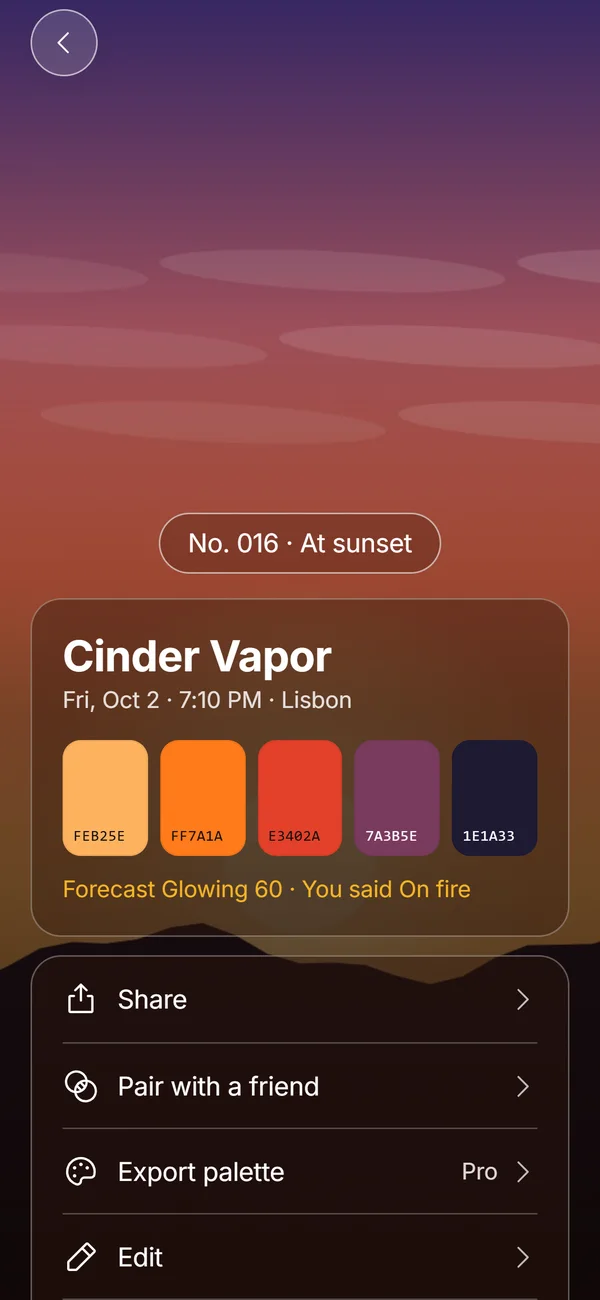
Yes, with Pro. A Hue Chip in Afterhue holds five colors read from a photo, ordered from the top of the sky to the horizon, and Pro can export that palette as a gradient wallpaper at 1170 by 2532 pixels, as a hex list or as a CSV file. The size is a standard iPhone screen size, and the system may scale it to fit a different model. The colors are read on your phone and nothing is uploaded.
A gradient has no horizon or clouds, so it works as a calm background that still carries the mood of the evening.
How do I make the chip first?
Tap Catch it on the Tonight screen or the plus in Collection, take or choose a sunset photo and wait while Afterhue reads the colors. You can tap a swatch to choose a different color from the photo, rename the chip and save it. The full process is in the guide to sunset color palette hex codes, and the Hue Chips page explains how the five colors are chosen.
Should I use light or dark wallpapers?
Match your habits. A bright, warm wallpaper is cheerful by day and can feel harsh at night. A deep blue-hour or afterglow wallpaper is easy on the eyes after dark. iOS can also dim the wallpaper when Dark Appearance is on, so a mid-tone sunset still works at night. Two photos from the same evening, one at golden hour and one at blue hour, make a natural pair for a Lock Screen and a Home Screen. See what is blue hour for the light.
What about the Home Screen separately?
You can set a different look for the Home Screen if you want the Lock Screen to stay as the photograph. A blurred or gradient version of the same sunset keeps icons readable while echoing the picture. When you add a wallpaper, the customize screen lets you choose a blur or a color gradient for the Home Screen. A soft gradient pulled from your photo's palette is the safest option, because it never competes with icons.
How do I keep a collection of wallpapers?
Make an album called Wallpapers in Photos and save the shots you like. Rotate them with the seasons: warm gold in autumn, clean pink in winter, deep blue in summer evenings. Your Sky Strip is a good source, since each stripe is a day and you can tap it to open the chip behind it. Choose a day that had a color you want to see every morning.
What should I avoid?
Avoid very high contrast photos, because icons and text will get lost. Avoid upscaled low-resolution shots, which look soft on a modern display. Avoid anything with a strong center subject, since widgets and icons will cover it. And avoid editing the sky so far that it looks unreal on a phone, where you see it hundreds of times a day. The guide to editing a sunset photo on iPhone has gentle settings.
Is a wallpaper from my own photo private?
Yes. It is a photo on your phone, set in your own settings. Afterhue does not upload the photo when it reads colors, and a shared chip link carries only the palette, name, date, city and score. If you save a card to your library, the app asks for add-only access at that moment. The privacy page has the full account of what is stored.
Frequently asked questions
How do I set a sunset photo as my iPhone wallpaper?
Open the photo in Photos, tap the share button and choose Use as Wallpaper, or go to Settings, Wallpaper, Add New Wallpaper. Adjust the position and tap Add.
What size should an iPhone wallpaper be?
It depends on the model. A tall image at least as large as your screen works. Afterhue Pro exports gradients at 1170 by 2532 pixels.
Can I make a wallpaper from a sunset color palette?
Yes. With Pro, Afterhue exports a chip's five colors as a gradient wallpaper, a hex list or a CSV file.
Why does my wallpaper look different with the clock on?
The clock and widgets sit over the top of the image. Shift the crop so the brightest part is away from the time.
Does Afterhue upload my photos?
No. Colors are read on the iPhone and the photo stays inside the app.
Keep exploring
 Hue ChipsFive colors, a name, a number and your rating from one sunset photo, made on the device.Sunset Color Palette Hex Codes and How to Pull Your OwnThree sunset palettes with hex codes, plus how to pull exact colors from a photo.How to Edit a Sunset Photo on iPhone in PhotosThe few Photos sliders that matter for sunsets, in order, plus when to stop editing.Sky StripA year of sunsets as 365 stripes, a month grid and a streak that forgives cloudy weeks.